As education rapidly shifts toward digital environments, a wide range of online teaching platforms have emerged to support teachers and students in instruction, assessment, and classroom management. However, this swift development has also brought about a significant challenge: operational complexity. When an application tries to pack in too many features without an intuitive design, teachers end up spending more time learning how to use the tool instead of focusing on their expertise.
NineQuiz was created to address this concern head-on—by streamlining the entire online teaching process while still providing all the essential functions. This is an online education platform designed with teachers in mind, focusing on two core needs: scheduling online classes and creating assessments.
NineQuiz is more than just software—it's your companion in digital teaching
No more juggling multiple apps
One of the most common challenges teachers face today is having to “jump” between different tools: one app for video calls, another for sharing assignments, and yet another for creating quizzes. This fragmented approach makes classroom management disjointed and difficult to control.
NineQuiz brings everything together in a single platform. Teachers can organize classes via Google Meet, Zoom, or Microsoft Teams—right within the software interface. Switching between tools is no longer a hassle.
Minimalist design—easy to use from day one
A major advantage of NineQuiz is its minimalist interface, perfect for teachers who aren’t tech-savvy. The layout is clear, intuitive, and easy to navigate, ensuring teachers can get started quickly without needing extra technical training.
1. Online class scheduling—Effortless connections, effective management
Scheduling online classes may seem simple, but it can become a headache if you have to use too many separate platforms. With NineQuiz, everything is streamlined into a few easy steps, connecting directly to popular meeting platforms.
NineQuiz supports the three most popular online learning platforms today:
-
Google Meet
-
Zoom
-
Microsoft Teams
This integration offers clear benefits: teachers don’t have to open multiple tabs, worry about students joining the wrong link, and can fully control the class schedule and roster.
How to schedule an online class on NineQuiz:
-
Go to www.ninequiz.com
-
Log in with your Gmail account or a registered account
-
Select the “Create and manage quizzes” interface
-
Go to the “Online learning” section
-
Click “Add class schedule”
-
Enter the required information:
-
Class title
-
Date and time
-
Choose the online platform (Google Meet, Zoom, Microsoft Teams)
-
Select class
-
Enable or disable auto-approve for students
-
-
Click “Add” to finish
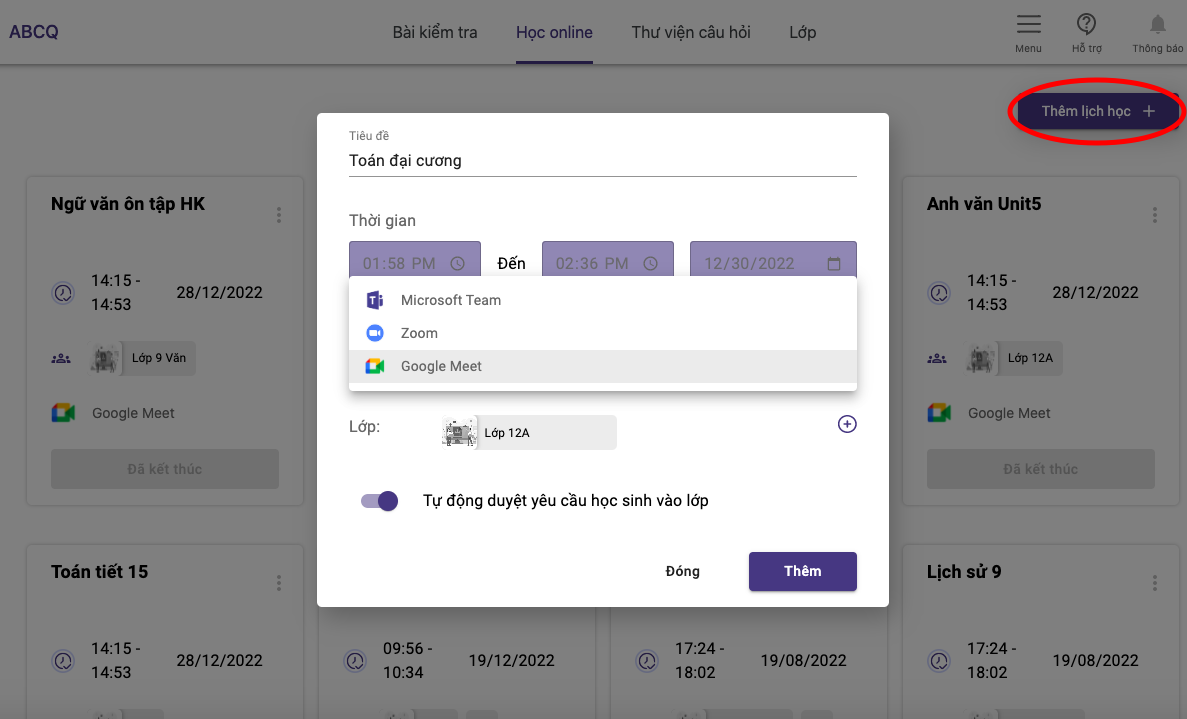
Just a few simple steps and you’ve successfully scheduled an online class with integrated video and classroom management features.
2. Quiz creation and settings—Streamlined assessment, faster grading
Assessments are an essential part of teaching—but also one of the most time-consuming for teachers. From drafting questions, distributing tests, supervising, to manual grading… all of these can be overwhelming, especially with large classes.
NineQuiz automates most of this process for you:
-
Easily create essay or multiple-choice quizzes
-
Set time limits and schedule quiz releases
-
Automatic grading for multiple-choice tests
-
Track and record the entire student test-taking process
-
Auto-submit when students leave the test screen
-
Randomize question and answer order for each student to prevent cheating
All of this is managed within a single interface—no need to switch between different programs.
How to create a quiz on NineQuiz:
-
Go to https://ninequiz.com
-
Log in to your account
-
Access the teacher dashboard
-
Select “Create quiz”
-
Enter the basic information:
-
Title
-
Category (if needed)
-
Set up student groups
-
Set time limits
-
Other display options
-
-
Add questions:
-
Enter manually
-
Upload from your computer
-
Or select from the question bank
-
-
Enter question content, answers, and point values
-
Finish and publish the quiz
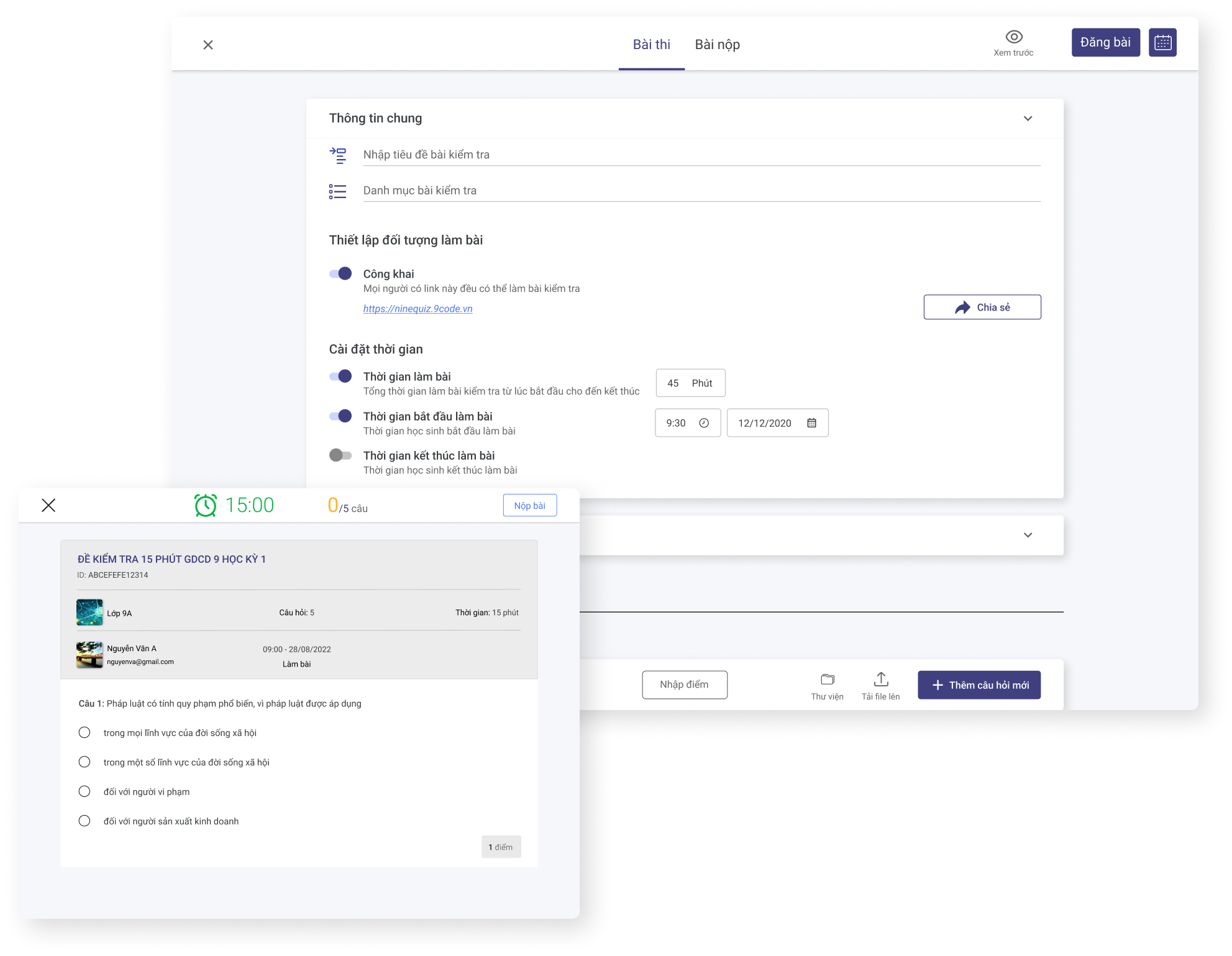
Create online quizzes with NineQuiz
NineQuiz isn’t just for teachers—it’s a powerful assistant for schools and organizations
Beyond individual teachers, NineQuiz also supports classroom management and large-scale exam organization, making it ideal for training centers, schools, and assessment organizations. Its robust admin interface, class management, test randomization, and learner tracking features make organizing online exams more professional and transparent than ever.
NineQuiz is one of the most effective and user-friendly online learning solutions available today, especially for teachers without a tech background. Its simplicity, paired with powerful features, makes NineQuiz the optimal choice for organizing online classes and assessments—without wasting time or effort.