
In today’s digital age, integrating technology into education is no longer just a trend—it has become a necessity. Among the methods modern educators are embracing, creating online multiple-choice questions stands out as a solution that saves time, increases transparency, and enhances learning outcomes. NineQuiz, a platform developed by Vietnamese professionals, is emerging as a powerful tool that makes this process easier than ever for teachers.
The Importance of Creating Online Multiple-Choice Questions
Convenience is the first and most prominent advantage. Traditionally, teachers spend a great deal of effort building question banks, categorizing tests, printing, and grading. With online multiple-choice formats, all these tasks are streamlined and automated. The system helps teachers create comprehensive tests, automatically shuffle questions, randomize answer choices, and instantly grade students’ submissions.
Beyond convenience, online assessments also ensure objectivity and fairness. Digital testing platforms virtually eliminate cheating and provide accurate reflections of each student’s abilities through detailed analytics and statistical reports.
NineQuiz – A Smart Test Creation Platform for Teachers
NineQuiz’s strength lies in its fully Vietnamese interface, designed to be user-friendly and intuitive. Rather than overwhelming users with excessive features, NineQuiz focuses on the essentials: creating and managing tests, as well as organizing online classes.
With just a few simple steps—logging in with Gmail or a registered account—teachers can quickly access the system and start creating tests. The “For Teachers” interface allows users to enter all necessary test details: title, description, time limit, target students, and more. Teachers can then add questions flexibly, either by entering them manually or uploading from an existing file.
What’s more, if you already have a set of multiple-choice questions in Excel, the system allows for easy uploading. Should there be any formatting errors, NineQuiz provides a template file so you can adjust your content before uploading again.
Accelerate Teaching – Fast Sharing, Clear Analytics
Once your test is ready, you can instantly publish and share it with students via a direct link. There’s no need to create individual accounts or require app downloads—students simply access the link to begin their test.
Teachers can easily manage submissions, track each student’s progress, and view detailed statistics on scores and question-by-question accuracy. This is a major advantage for assessing student performance and developing personalized learning pathways.
A Small Step Forward – A Giant Leap for Digital Education
Using NineQuiz to create online multiple-choice questions is not just a technical solution, but a strategic move in the digital transformation of education. Teachers gain greater flexibility in their teaching methods, students have easier access to knowledge, and schools save significant resources in organizing exams.
With the support of a user-friendly, Vietnamese-language, and free platform like NineQuiz, anyone can begin modernizing their student assessment methods—simply and effectively.
NineQuiz – Test Creation Software for Teachers
Developed by a Vietnamese team, NineQuiz offers a fully Vietnamese, intuitive, and user-friendly interface. The software supports a range of features, including class creation, schedule management, and flexible development and deployment of multiple-choice assessments.
Key Features of NineQuiz:
-
Create and manage classes by group
-
Schedule online lessons and tests
-
Access a library of ready-made questions
-
Automatic grading and student monitoring
How to Create Multiple-Choice Questions with NineQuiz
Step 1: Log in to Your Account
-
Visit the official website: https://ninequiz.com
-
Log in with your Gmail or a previously registered account
-
Then select “For Teachers” on the main interface
Step 2: Create a New Test
-
From the dashboard, select “Create Test”
-
Enter the main information, such as:
-
Test title
-
Short description (optional)
-
Category (by class, academic year, etc., depending on your management preferences)
-
Time limit
-
Custom settings (show/hide answers, shuffle questions, etc.)
-
Step 3: Add Questions to the Test
Option 1: Upload Questions from a File
-
Click the “Upload” button to upload your file
-
If the system does not recognize the file, download the template, adjust your content to the correct format, and re-upload
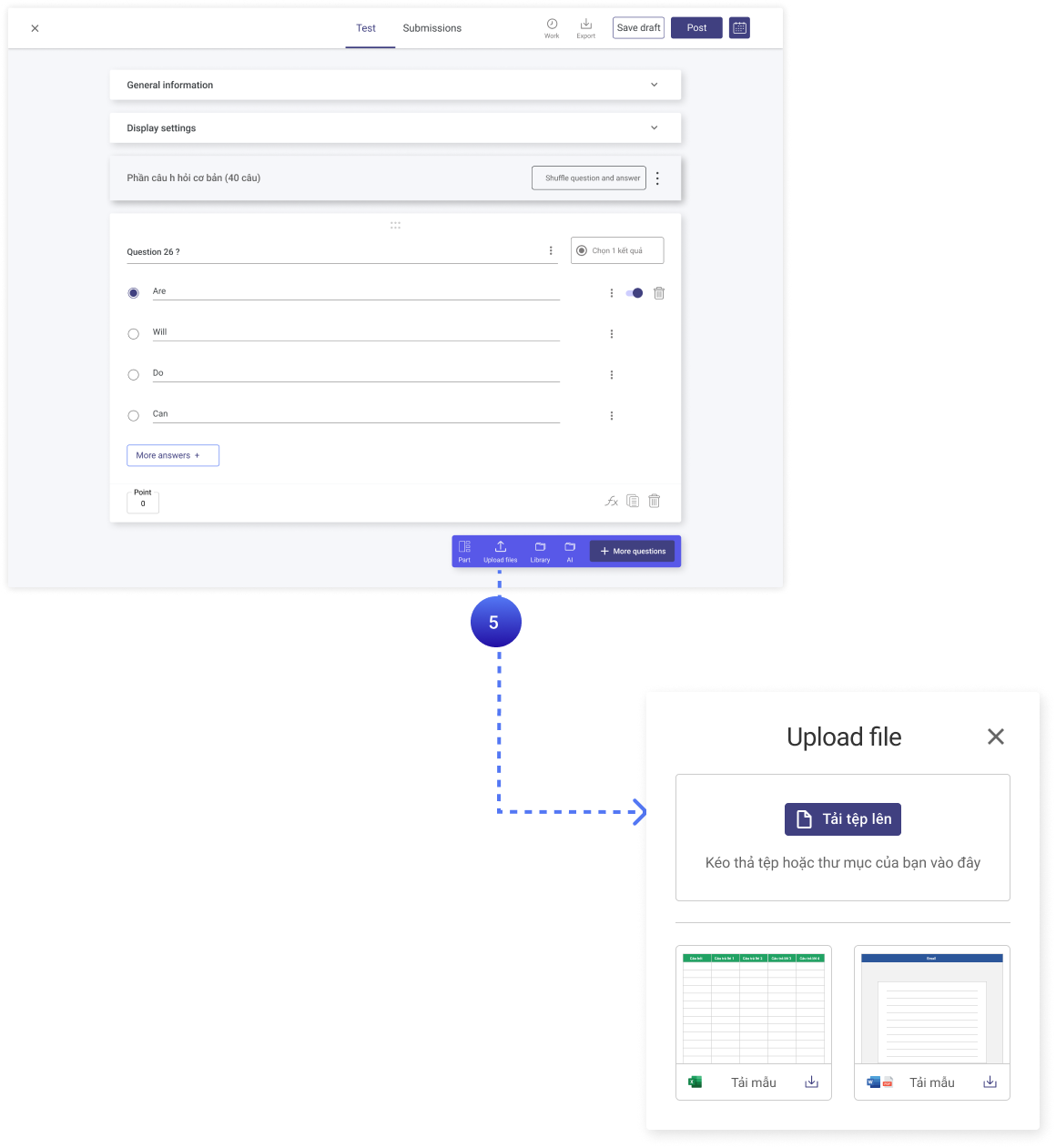
Upload ready-made online multiple-choice questions
Option 2: Manually Enter Each Question
-
Click “Add Question”
-
Enter the question content and answer choices
-
Select the correct answer
-
Continue clicking “Add New Question” to create more
Step 4: Publish the Test
-
Once finished, click “Publish” in the top right corner
-
Your test will appear in the list of active tests
Step 5: Share the Test
-
Return to your test list and click “Action” to get the link
-
Send the link to students so they can start the test (no account or app installation required)
Step 6: View Submitted Tests
-
Go to the published test section
-
Select the “Submissions” tab to view results and students’ test progress
Using NineQuiz to create online multiple-choice questions not only reduces teachers’ workloads but also improves teaching effectiveness. With these simple steps, you can easily design, share, and manage your tests professionally and efficiently.
Start today at https://ninequiz.com and harness the power of technology to make teaching more flexible and engaging!
Related articles
nền tảng NineQuiz cho giáo viên