Are you preparing to organize an event but feel overwhelmed with entering the guest list, managing responses, and arranging information manually? Don’t worry, the Ninetick app is the optimal solution for you.
With a user-friendly interface, quick operations, and powerful data synchronization capabilities, Ninetick helps you create events and manage guest lists in just a few minutes – even less than 5 minutes if you have prepared the information in advance.
Visit https://ninetick.com/ to experience the online event management application
Benefits of Using Ninetick to Organize Events
1. Time-saving through automation
No need to create manual lists or send individual confirmation emails, Ninetick helps you accomplish all with just a few clicks.
2. Professional guest management
From categorization, sending personalized QR codes to guest check-in – every step is digitized and automated, ensuring accuracy and professionalism.
3. Powerful system integration
Ninetick allows synchronization with email platforms, CRM, or exporting report data in an instant.
4. Flexible security permissions
You can set different access rights for each management group, ensuring data protection and consistent updates.
Guide to Creating an Event on Ninetick in Just 5 Minutes
Step 1: Log in and access the Ninetick dashboard
Visit the homepage https://ninetick.com/ and log into your account. If you don’t have an account yet, you can register for free in just 1 minute.
After logging in, you will see the Management Dashboard – a place that aggregates all the events you have organized or are organizing.
Tip: Name your event clearly, including the date for easy future reference.
Step 2: Create a new event
Click the “Create Event” button.
Required information includes:
- Event name
- Brief descriptive information about the event content
- Event date and time
- Format of the event (online or offline). If the event is online, Ninetick integrates with online platforms such as Google Meet, Zoom, etc. For offline events, you will update additional information about the venue.
- and the location
- Profile picture (if any) to increase recognition
- Event schedule
You can also add:
- Event logo
- Check-in gate opening/closing times
- Invitation link or embed on website
Step 3: Create the registration form
Here, Ninetick provides basic information fields so you can collect data from customers registering to attend the event.
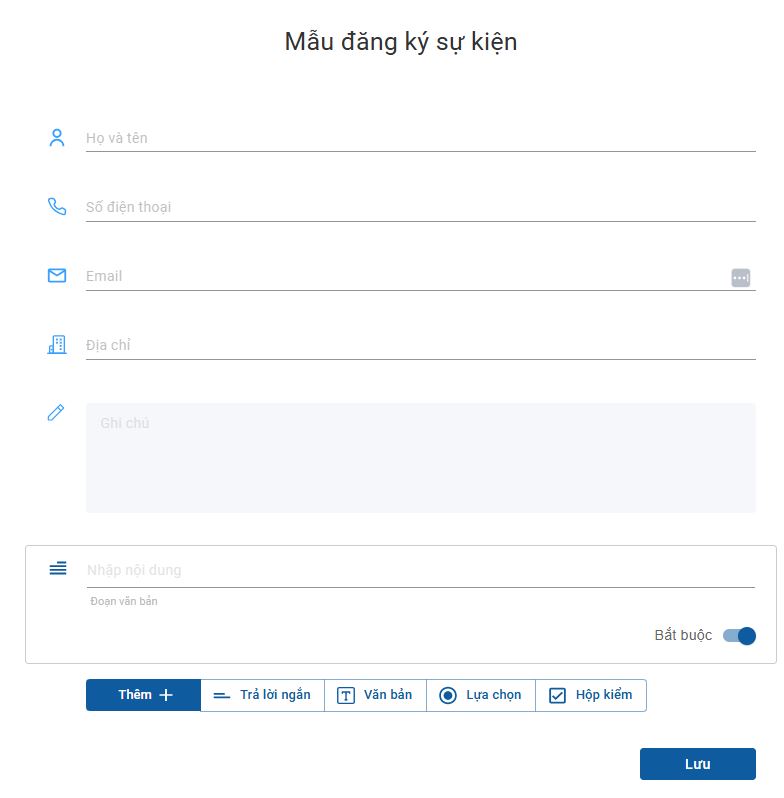
If you need to collect additional information, you can utilize features such as: question responses; multiple-choice questions; etc., to supplement your customer data.
At this point, just “Save” the registration information and proceed to “Publish” the event online, and you have completed creating the event.
Step 4: Manage & import guest list
After successfully creating the event, you will be directed to the Guest Management section.
Here, you can track information of customers who have registered to attend the event. You can even add guests to this data by:
Importing from Excel: download Ninetick’s Excel template, fill in the information, then upload.
Managing the guest list on a single platform will facilitate check-in and post-event reporting.
Thus, you have just completed how to create an event as well as manage and input the guest list on Ninetick. In the next article, Ninetick will help you share the event via link; QR code; and how to perform check-in with QR code scanning in just 1 second.
Tips for Faster Operations When Using Ninetick
-
Prepare the guest list in advance using the Excel template
- Create professional invitation email templates from the start
- Use group tags to categorize guests by roles: VIP, press, internal, etc.
- Assign responsible persons for each check-in gate and set permissions in advance
Creating Events Has Never Been Faster and Easier
Whether you are new to event organizing or have extensive experience, Ninetick helps you save significant time and effort. In just a few minutes, you can create a complete, professional event, ready to welcome guests with modern QR technology.
If you are looking for smart event management software – start with Ninetick today.
Visit https://ninetick.com/ to experience the online event management application