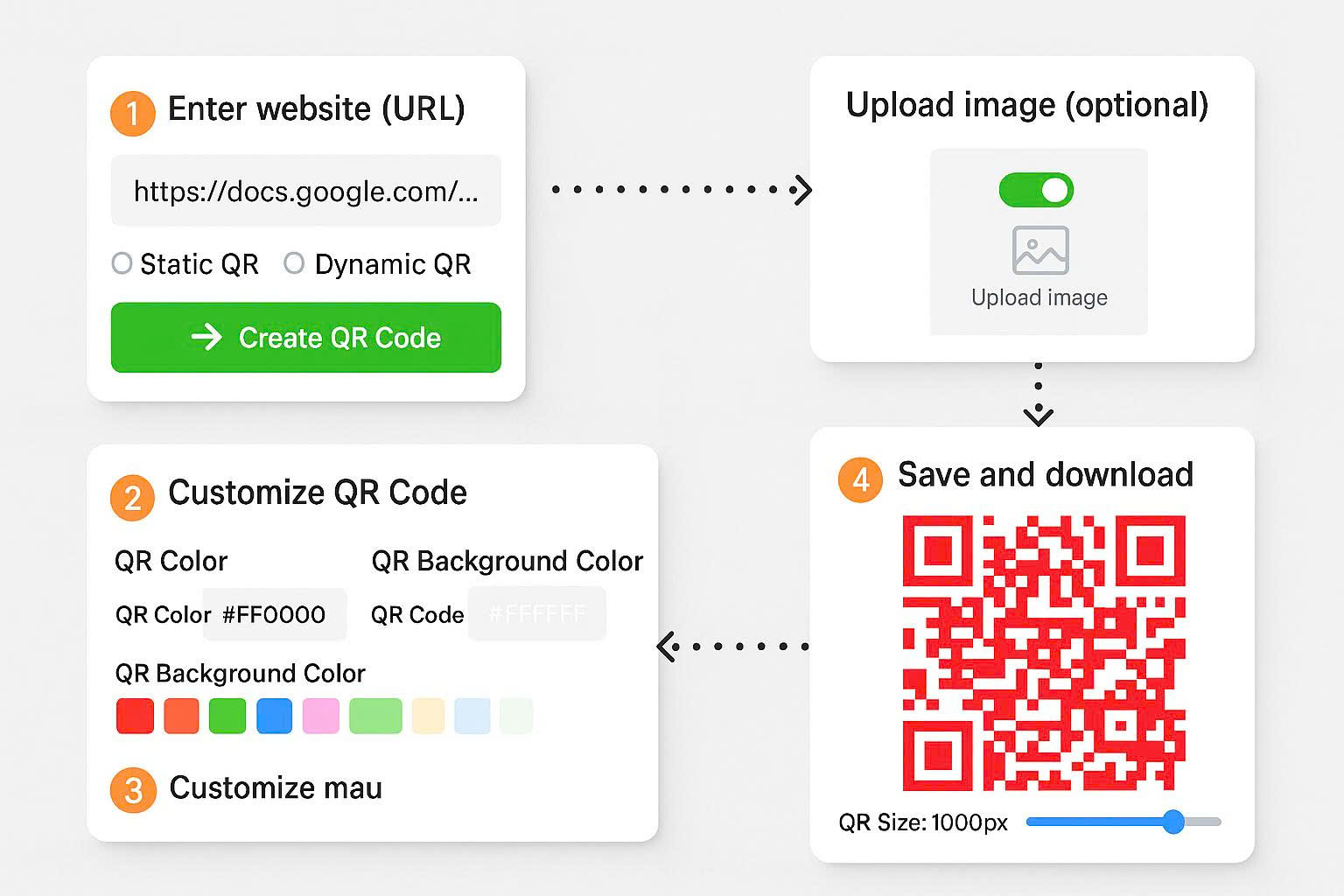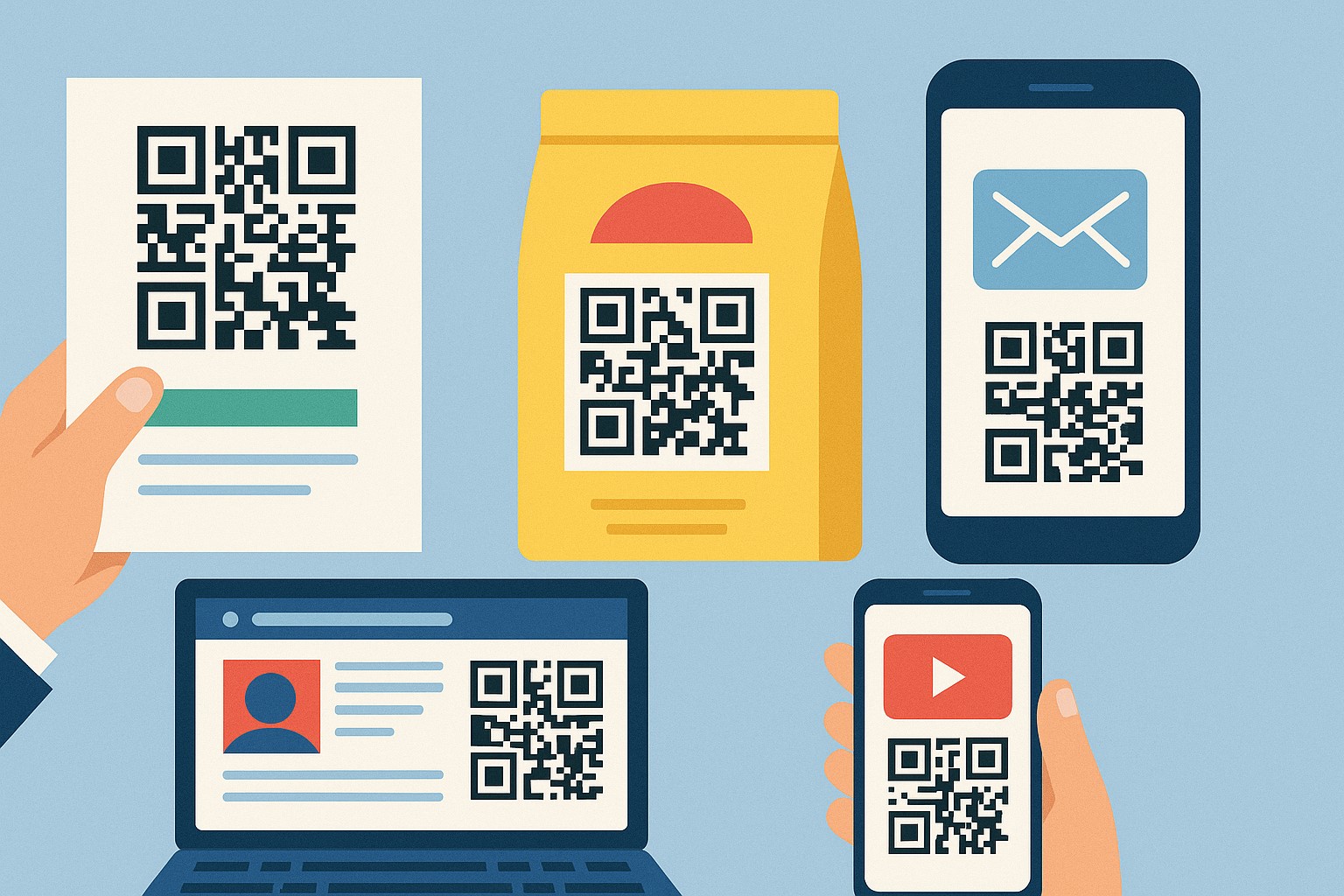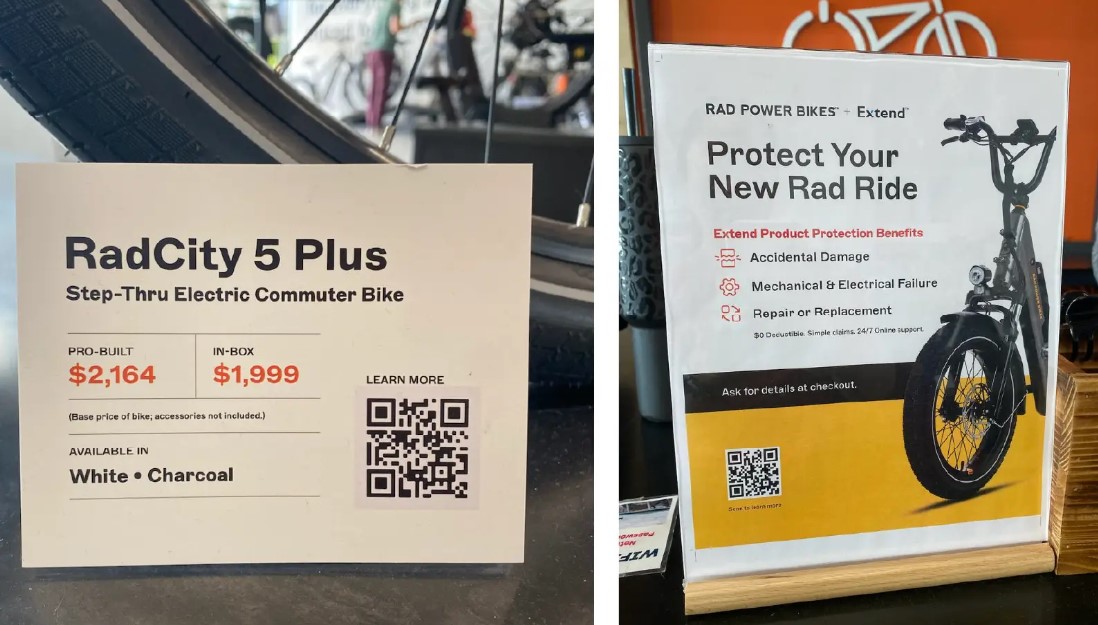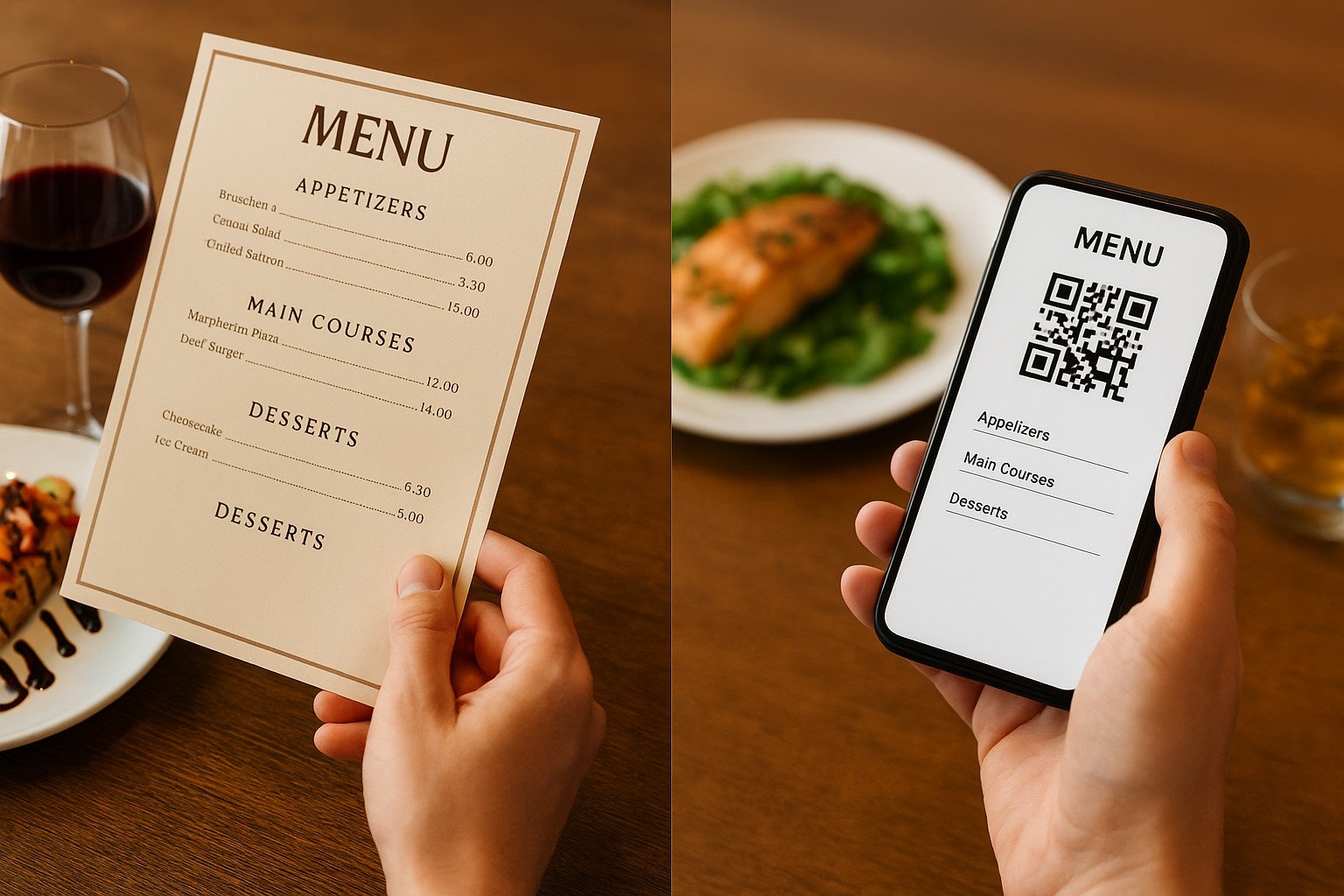
Common QR Code

7 QR Code Marketing Blunders That Kill Conversion Rates (and How to Fix Them)

In the modern US retail and service landscape, QR codes have evolved from a niche tech tool into a cornerstone of contactless engagement. From interactive restaurant menus to high-stakes Super Bowl commercials, the potential for instant connection is massive. However, many brands fall into the trap of deploying codes that frustrate users rather than providing value. When a scan fails or leads to a dead end, you aren't just losing a click—you’re damaging your brand’s digital credibility.

To ensure your next campaign delivers a high Return on Investment (ROI), you must move beyond simply generating a code. You need a strategy that prioritizes scannability, user intent, and technical reliability. Here is how to identify and fix the most common QR code pitfalls in today's market.

1. Sacrificing Scannability for "Over-Designed" Aesthetics

Branding is essential, but a QR code’s primary job is to function. A common mistake is creating codes with low color contrast, overly complex patterns, or massive logos that obscure the data modules. If a smartphone camera cannot instantly recognize the three corner squares (the "finder patterns"), the user will likely give up within seconds.

The Fix: Maintain a high contrast ratio (dark pixels on a light background is safest). If you add a logo, ensure it occupies less than 25% of the center area and doesn't interfere with the code's structural integrity. Always prioritize a clean, high-resolution output over artistic complexity.

2. The "Mystery Meat" Approach: Missing Call-to-Actions (CTA)

In the US market, consumers are value-driven. A naked QR code floating on a poster without context provides no incentive to scan. Users often wonder: "Is this a menu? A discount? A virus?" Without a clear instruction, your scan rates will remain stagnant.

The Fix: Always pair your code with a short, punchy CTA. Use phrases like "Scan to View Menu," "Get 20% Off Now," or "Join Our WiFi." Telling the user exactly what happens after the scan removes friction and builds trust.

3. Poor Contextual Alignment and Landing Page UX

Nothing kills a user experience faster than scanning a code on a specific product only to be sent to a generic corporate homepage. If a customer scans a QR code on a pair of running shoes, they expect to see a size chart, reviews, or styling tips—not a "Contact Us" page.

The Fix: Map your QR code to a specific stage of the buyer's journey. Ensure the destination page is 100% mobile-optimized. If the landing page is slow to load or difficult to navigate on a phone, the scan was a wasted opportunity.

4. Information Overload in Static Text Codes

While QR codes can store plain text, cramming a 500-word paragraph into a single code makes the pattern incredibly dense. This density makes it much harder for older smartphones to decode the information, especially in low-light environments.

The Fix: Keep it brief. If you need to share extensive information, use a URL QR code that directs users to a hosted mobile page. This keeps the QR pattern simple and the reading experience much more comfortable for the user.

5. Skipping the "Real World" Stress Test

A QR code that works on a 27-inch designer monitor might fail when printed on a glossy business card or a matte billboard. Lighting, distance, and print material all affect scannability. Printing thousands of marketing materials with a broken or unreadable code is an expensive mistake.

The Fix: Test your code across multiple devices (iOS and Android) and in various lighting conditions. Print a sample at the actual size it will appear in the campaign to ensure the camera can focus on it from a natural distance.

6. Ignoring Sizing and Placement Logic

Size matters. A QR code on a highway billboard needs to be massive, while one on a restaurant table can be small. Furthermore, placing codes in areas with no cellular service (like subway stations) or on moving objects (like the side of a bus) significantly lowers the success rate.

The Fix: Follow the 10:1 ratio rule (if the user is 10 inches away, the code should be at least 1 inch wide). Ensure the code is placed at eye level and in areas with reliable internet connectivity.

7. Using Unreliable or Limited Generation Tools

Not all QR generators are created equal. Some free tools produce low-resolution files that blur when resized, or worse, they insert "middle-man" ads that frustrate your customers. For a professional campaign, you need a tool that offers flexibility, high-quality vector exports, and various data types.

The Fix: Use a robust platform designed for business needs. Qrcode-gen is a premier solution that allows you to create high-resolution codes for URLs, WiFi, vCards, and digital menus. It provides the customization options needed to align with your brand while ensuring the technical backend remains rock-solid.

The Bottom Line: QR codes are a bridge between the physical and digital worlds. By avoiding these common design and strategic errors, you can transform a simple black-and-white square into a powerful engine for customer engagement and conversion. Test often, provide clear value, and use professional tools to ensure every scan counts.

Nine Asset Review: The Pioneering "All-In-One" QR-Based Asset Management Solution

Amidst the global wave of digital transformation, businesses are increasingly realizing that traditional management tools—like handwritten logs or fragmented Excel spreadsheets—are no longer capable of handling growing and complex asset portfolios. The need for a lean, tech-driven solution that is accessible anytime, anywhere, has become more urgent than ever.

In this landscape, Nine Asset emerges as the ultimate solution, redefining how we interact with corporate fixed assets. Moving away from the path of bulky ERP software that takes months to deploy, and avoiding mobile apps that eat up phone storage, Nine Asset is a comprehensive and flexible Web-based platform.

So, what can this tool actually do? And why is it considered the "missing piece" in the operational systems of modern enterprises? Let’s dive into its core features below.

1. A Frictionless Experience: No Installation, Total Device Compatibility

The biggest advantage—and the fundamental differentiator—of Nine Asset compared to other solutions on the market is its "Web-based" nature.

Typically, to deploy a management system, businesses must have IT staff install software on every computer or require all employees to download an app onto their personal phones. This inadvertently creates significant barriers: operating system incompatibilities, older devices failing to run the software, and the constant inconvenience of manual updates.

Nine Asset completely eliminates these obstacles. All you need to do is open a web browser (such as Chrome, Safari, or Edge) on any device—from laptops and tablets to smartphones—and log in. All data is instantly synced to the Cloud. This means you can start managing your assets immediately, from anywhere with an internet connection, without consuming a single megabyte of device storage.

2. Digital Identity: Turning Static Assets into Living Data

The core feature that drives the power of Nine Asset is its ability to apply QR Code technology to asset identification.

Instead of managing items with generic, confusing names like "Dell Laptop" or "Office Chair," the system allows you to generate unique QR codes for every single piece of equipment. This process is optimized for speed: simply import your asset list, and with one click, Nine Asset automatically generates hundreds of corresponding QR codes, ready to be printed and tagged.

When these QR codes are scanned, the device doesn't just display a random string of numbers; it reveals a detailed profile: from configuration specs, purchase date, and original value to current status (active/broken) and the person currently responsible for it. If you are considering building this system from scratch, referring to standards like this Guide to Asset Management using QR Codes will help you organize your data scientifically and professionally from the very first step.

3. Smart Inventory: Speed Meets Precision

This is the feature that liberates administrative departments from the drudgery of manual stocktakes. Nine Asset transforms an employee's smartphone into a professional inventory scanner without the need for expensive external hardware.

The workflow is designed for real-world efficiency: a manager creates an inventory session on the web, and staff simply access the Nine Asset website on their phones, select "Scan" mode, and point the camera at the QR tag on the asset.

The system automatically reconciles the scanned code against the official asset registry in real-time. If an asset is scanned that doesn't belong to the department being audited, the system flags it as a "Surplus Asset" (or discrepancy). Conversely, assets on the list that haven't been scanned are reported as "Missing Assets." All results are updated instantly on the central dashboard, allowing managers to grasp the situation and make quick decisions without waiting for manual report consolidation.

4. Lifecycle Management and Maintenance

Effective asset management isn't just about knowing "where" something is, but also understanding its "health." Nine Asset provides a toolkit to track the entire lifecycle of equipment, from procurement (Onboarding) to disposal.

The automated maintenance reminder feature is particularly useful. You can set up recurring maintenance schedules for critical equipment. When a due date approaches, the system sends a notification to the technical department. Repair history and part replacements are also recorded in detail within the asset's profile. This data serves as a vital foundation for evaluating usage efficiency, helping businesses avoid mistakenly disposing of functional machinery or holding onto equipment that has become too costly to repair.

5. A Powerful, Connected Ecosystem

A sophisticated touch that ensures a seamless user experience is the connectivity within the Ninecode ecosystem. If you have previously used the popular Qrcode-gen tool, you can use your existing account to log in and work on Nine Asset thanks to Single Sign-On (SSO) mechanics.

This synchronization helps businesses manage their digital tools centrally, minimizing the need to remember multiple accounts and passwords while opening up possibilities for flexible data integration and expansion in the future.


Nine Asset is more than just an online logging tool; it represents a new management mindset: more transparent, faster, and more cost-effective. By completely removing the burden of installation and leveraging the power of a web platform, this is truly the ideal solution for businesses seeking agility in their digital transformation journey.

Don't let your company's valuable assets slip away due to loose management processes. Start your digitization journey and take full control today at Ninecheck.one.

Color Contrast Guidelines: Ensuring Your QR Codes Are Always Scannable

When designing QR codes, many businesses prioritize brand aesthetics while overlooking the most critical factor: the contrast ratio. This single element determines whether a code is scannable, whether it is printed on packaging, posters, menus, or displayed on a smartphone screen. If the contrast is off, the QR code may become unrecognizable, disrupting the customer experience and tanking marketing ROI. This article will guide you through the essential color rules to ensure your QR codes remain scannable in any environment.

1. Why Contrast Ratio is Critical for QR Code Functionality

QR codes operate on the principle of distinguishing between light and dark regions. A camera sensor analyzes the variance between two color segments to identify the code's individual modules. Therefore, the higher the contrast, the easier the QR code is to read—even in low light, under screen glare, or on imperfect print materials.

Smartphone camera processing platforms utilize thresholding and edge detection algorithms. When the background and foreground colors blend together, the camera cannot differentiate between a "black" data point and a "white" space, resulting in the dreaded “Cannot detect QR Code” error.

It is important to note that color-coded QRs aren't the only ones at risk; even a standard black-on-white code can fail if the printing is too light or faded. Consequently, contrast must always exceed the minimum threshold, particularly when the QR code is used in high-glare environments or printed on specialized materials like plastic, glass, or glossy finishes.

An unscannable QR code leads to direct losses: customers can't view your menu, they miss out on promotions, and businesses lose valuable user data. This is why the contrast ratio is considered a non-negotiable rule in QR design.

2. Essential Color Contrast Principles for QR Codes

To ensure optimal scannability, designers must adhere to several fundamental principles. These criteria are based on visual research, WCAG accessibility standards, and QR recognition algorithms.

Use Dark Colors for QR Modules

The QR code modules should be significantly darker than the background. While pure black is not strictly required, the color should have an equivalent depth or at least 70–90% intensity on the luminance scale.

Navy blue, deep purple, dark brown, and forest green are all viable options, provided they achieve the necessary brightness differential.

The Background Must Be Lighter Than the QR Code

A light background significantly boosts contrast. A dark QR code on a white or light pastel background is the gold standard. Conversely, a light QR on a dark background (inverted) is a recipe for scanning failure.

Some brands attempt "light-on-dark" designs for aesthetic reasons, but this conflicts with standard QR algorithms and can reduce scannability by up to 60%.

Maintain a Minimum Contrast Ratio of 4.5:1

This figure is based on WCAG standards for text, but for QR codes, higher is always better. A 4.5:1 ratio is the bare minimum for a camera to distinguish modules in most lighting conditions.

If the QR is printed on glossy material, you should aim for a contrast ratio of around 7:1 to compensate for potential light reflection.

Avoid Complex Gradients

Gradients with too many colors or soft transitions can confuse the camera's ability to identify module boundaries. If you must use a gradient, stick to colors with similar luminance or keep the transition within a dark color range.

A "light → dark → light" gradient is the most common cause of QR errors.

Avoid Neon or Oversaturated Colors

Neon shades like hot pink, electric blue, and bright yellow reflect intense light and easily "wash out" under a camera lens. While they look striking to the eye, neon QR codes have a very high failure rate.

Maintain Consistent Module Size

Even with perfect colors, a QR code will fail if the modules are distorted, too small, or unevenly printed. Always maintain high resolution and avoid scaling the code below the minimum recommended size (2 cm x 2 cm for print).

3. Common Color Mistakes That Render QR Codes Unscannable

When businesses prioritize aesthetics over function, they often fall into these common design traps.

Using Similar Tones for the QR and Background

For example: a dark blue QR on a light blue background, or deep purple on black. When a camera adjusts its exposure, these colors can bleed together, making them indistinguishable.

Choosing Colors Based on Feeling Rather Than Luminance

Purple and navy blue might both feel "dark," but their actual luminance values can vary wildly. QR design must be based on objective luminance, not subjective color perception.

Printing QR Codes on Patterned Backgrounds

Backgrounds with patterns like marble, wood grain, illustrations, or metallic textures can break the visual integrity of the QR modules.

Over-Engineering "Artistic" QR Designs

Artistic QR codes can work well, but if you distort too many modules, add oversized icons, or break the outer frame, scannability drops significantly.

Insufficient Border Width (Quiet Zone)

A white border around the QR code (the quiet zone) is mandatory. If this area is cropped or too thin, the camera cannot identify where the code begins and ends.

4. How to Design High-Contrast QR Codes for Seamless Scanning

To ensure your QR codes always perform as expected, follow these professional design steps.

Prioritize Dark Codes on White Backgrounds

The most reliable formula: dark code + white background. This provides the highest possible contrast and works flawlessly in almost any environment.

Verify Luminance with Online Tools

Use WCAG-compliant contrast checkers to determine the brightness ratio between your two chosen colors. If it falls below 4.5:1, adjust your palette immediately.

Test Before Mass Printing

Always test your code with at least three different devices: a newer iPhone, a high-end Android, and an older Android model. Each device uses slightly different processing algorithms.

Test on Actual Materials

Glossy plastic menus, outdoor posters, and waterproof stickers all reflect light differently. You must perform a scan test on the final material.

Use Dynamic QR Codes for Flexibility

Dynamic QR codes allow you to update the destination content without changing the physical code. This gives you more flexibility if you need to adjust the design's color or size later on.

5. QRCode-Gen: Your Solution for High-Contrast, Industry-Standard QR Codes

QRCode-Gen offers intelligent color customization to ensure your QR codes always maintain sufficient contrast for maximum readability. The platform helps you select optimal colors and automatically preserves the necessary quiet zone around the code. Furthermore, our dynamic QR features allow you to change content without re-designing the code, eliminating the risk and cost of mass re-printing.

Additionally, our system provides comprehensive scan data tracking, helping businesses monitor the effectiveness of their QR codes across different locations and detect any scanning issues in real-time.

If you want to create QR codes that meet color contrast standards, scan effortlessly, and are optimized for both print and digital use, try QRCode-Gen for free today to generate beautiful, secure, and professional QR codes.


Why Year-End Asset Audits Are a Perpetual Nightmare for Businesses—and How to Fix It

For HR, Admin, and Accounting departments, the end of the fiscal year is often described as a "silent war"—intense and high-stakes. Beyond the pressure of finalizing reports, tax settlements, and organizing year-end parties, they face a monumental task: Asset Inventory.

Regardless of company size, traditional inventory processes are notorious for causing headaches. Picture thick stacks of A4 printouts, heated debates over which department "owns" a specific chair, or employees crawling under dusty desks to find machine serial numbers... it all creates a picture of chaos and inefficiency.

Why, in the digital age, do we still settle for such a risky, manual approach? And is there a solution to turn this "inventory nightmare" into a smooth, accurate, and transparent process? Let’s find the answer by diving deep into the current reality and the Web-based QR Code Asset Management solution.

1. The "Laugh-Cry" Reality of Traditional Inventory Processes

If you’ve never personally participated in a full-scale inventory audit, it’s hard to imagine the complexity. For companies relying on manual methods, the process usually begins by exporting an asset list from Excel and printing it out. Then, the inventory committee splits up to "count" everything room by room.

The first hurdle is identification. The list might say: "1.2m Industrial Wood Desk - Quantity: 50." You walk into the office and see 50 identical desks. Which one is fully depreciated? Which was bought last month? Which is assigned to Employee A? This ambiguity turns inventory into a guessing game, leading to data that is more about "checking a box" than actual accuracy.

Then there’s the labeling issue. Barcodes or handwritten paper tags often peel off, fade, or get covered in dust after a year. Staff spend ages trying to read and record long strings of digits. One typo, and the entire reconciliation process becomes meaningless. The pressure of time combined with the physical exhaustion of moving between floors and warehouses is the leading cause of data discrepancies (Human Error).

2. The Consequences of "Slow but Unsteady" Inventory

A long, drawn-out inventory period doesn't just disrupt business operations; it creates significant hidden costs.

  • First, wasted labor costs: Instead of focusing on their core responsibilities, employees spend 3 to 5 days—sometimes a whole week—counting assets. When you convert these man-hours into salary, the company is paying a steep price for a task that could be entirely automated.
  • Second, information lag: With manual methods, after filling out paper forms, staff must return to the office and manually re-enter the data into a computer. This adds several more days for compilation and error correction. By the time the report reaches the director’s desk, the data may no longer reflect reality, as assets may have been moved or damaged in the interim.

To solve this at the root, businesses need to shift from "Static Management" to "Dynamic Management." The first and most crucial step is standardizing the identification system from the start. You can learn more about labeling and system setup in our in-depth Guide to Asset Management with QR Codes for a comprehensive overview before diving into the tech solution.

3. The "Touchless" Revolution with Nine Asset and QR Codes

The advent of QR Code technology has completely changed the asset management landscape. No more pens and paper, no more squinting at serial numbers—the Nine Asset solution offers a brand-new inventory experience powered by a Web-based Application.

The greatest advantage of Nine Asset is its "barrier-free" convenience. Businesses don't need to invest in expensive specialized scanners, and employees don't need to waste storage space downloading complex apps. Everything runs smoothly right in a smartphone's web browser (like Chrome or Safari).

The mechanism is simple: Each asset is assigned a "Digital ID" in the form of a QR code. This code contains a direct link to the asset's data profile stored in the Cloud.

During an inventory audit, staff simply use their smartphones to access the Nine Asset website, select the "Scan" mode directly in the browser, and point the camera at the QR code on the equipment. Upon confirmation, the system automatically performs a series of background tasks: verifying the asset's existence, updating its physical location, and recording the time and the person performing the audit. The processing speed is lightning-fast—less than 2 seconds per asset—reducing total inventory time by up to 10 times compared to manual methods.

4. The Superiority of "Real-Time Audit" Features

The biggest difference between Nine Asset and Excel or manual methods is the ability to synchronize data instantly (Real-time Sync) on a cloud platform.

Imagine you are a manager sitting in the central office, monitoring progress on your computer screen. Meanwhile, at the factory or various branches, staff are using their smartphones to access the Nine Asset website and scan codes. Every scan is instantly updated on your Dashboard: quantity audited, remaining items, and asset status.

Notably, the system supports automatic data reconciliation. For example: If an employee is conducting an audit in the "Warehouse" but scans a laptop whose records belong to the "Meeting Room." The software will automatically detect and flag this as a "Surplus Asset" (or location discrepancy) compared to the expected list. This allows managers to immediately catch unauthorized asset movements without waiting for the end of the audit to manually cross-reference.

Furthermore, because it is entirely Web-based, Nine Asset eliminates barriers related to installation or compatibility between different phone models. A business can deploy the system to hundreds of employees in minutes, whether they are using Android, iPhone, or tablets.

Digital transformation is not just a trend; it is a survival necessity for operational optimization. Applying technology to Asset Management doesn't just relieve HR and Accounting from the pressure of inventory season—it helps business owners preserve capital and prevent loss and waste.

Instead of spending precious year-end days buried in dust and paperwork, let technology handle the heavy lifting. A smooth, accurate, and professional inventory process is the perfect start to a successful new fiscal year.

It’s time for your business to say goodbye to messy Excel files. Start your asset digitalization journey and experience superior convenience today at Ninecheck.one.


QR Codes in Manufacturing: Standardizing Traceability and Optimizing Operational Workflows

The manufacturing industry is facing mounting pressure regarding quality, speed, and data traceability. Customers, partners, and regulatory bodies are no longer just interested in the final product; they demand full transparency regarding production processes, raw material origins, and quality control standards. In this landscape, digitizing factory information has become an absolute necessity.

QR codes have emerged as a simple yet powerful tool, bridging fragmented production stages into a seamless information system. From managing raw materials and controlling work-in-progress to post-factory product tracking, QR codes are systematically transforming how factories operate. This article provides a comprehensive analysis of the role of QR codes in manufacturing and why more businesses are adopting this technology.

1. Standardizing Traceability in Manufacturing with QR Codes

Traceability is a critical requirement in many sectors, including food and beverage, pharmaceuticals, electronics, and mechanical engineering. Manual record-keeping or fragmented data storage makes the retrieval process complex and prone to error.

QR codes allow for a unique identifier to be assigned to every batch of raw materials, semi-finished goods, or final products. By scanning a code, managers can instantly access information regarding origin, production dates, processing stages, and quality inspection standards. Standardizing traceability helps businesses meet transparency requirements and enhances their reputation with partners.

2. QR Codes in Raw Material and Inventory Management

In a factory setting, precise material management is a decisive factor in production efficiency. QR codes help track the flow of materials from the warehouse to the assembly line and back.

Warehouse staff simply need to scan a QR code to confirm inbound and outbound movements, reducing reliance on paper logs or manual data entry. This minimizes confusion, limits shortages or excess inventory, and significantly improves production planning capabilities.

3. Supporting Production Stage Control with QR Codes

Every stage of the production line must be strictly controlled to ensure quality output. QR codes allow stage-specific information to be attached directly to semi-finished products or specific production zones.

Upon scanning, personnel can identify which stages are complete, what comes next, and which standards must be followed. This reduces errors during handovers between departments and ensures that processes are executed in the correct sequence.

4. QR Codes in Quality Control

Quality control (QC) is a vital but often time-consuming and labor-intensive phase. QR codes help record and store quality inspection results systematically.

With each inspection, results can be linked directly to the product's or batch's QR code. When a review or audit is required, businesses can view the entire inspection history with a single scan, saving time and increasing data accuracy.

5. Bridging the Gap Between Production, Logistics, and Distribution

After leaving the factory, products continue through logistics and distribution channels. QR codes maintain information continuity from the factory floor to the warehouse and finally to the point of sale.

Maintaining the same QR code throughout the product lifecycle allows businesses to easily track status, troubleshoot issues, and manage product recalls if necessary. This is particularly crucial in industries with stringent safety and quality regulations.

6. Reducing Errors and Operational Costs with QR Codes

Production errors can lead to significant waste in terms of both materials and time. QR codes help mitigate common mistakes by simplifying operations and increasing the accuracy of data capture.

When processes are digitized via QR codes, businesses can reduce their reliance on paperwork, limit manual data entry errors, and optimize operational resources.

7. Dynamic QR Codes: Bringing Flexibility to the Factory Floor

Production workflows are frequently adjusted to accommodate new orders or technical specifications. Dynamic QR codes allow businesses to update product information, process steps, or instructions without needing to replace the physical QR codes already in use.

Many manufacturing enterprises choose QR code management platforms like Qrcode-gen to create and manage dynamic QR codes, track scan data, and ensure that information remains accurate and up-to-date.

8. QR Codes: A Vital Tool for the Modern Factory

From raw material warehouses and production lines to quality control and post-sale traceability, QR codes are becoming increasingly ubiquitous in modern factories. Implementing QR codes not only helps businesses improve operational efficiency but also better meets the demands for transparency and standardization in manufacturing.

Factories that deploy QR codes systematically often report better oversight, reduced risks, and a stronger long-term competitive edge.


QR codes are playing a pivotal role in driving the digitization of the manufacturing industry toward greater transparency, accuracy, and efficiency. By applying QR codes strategically, businesses can standardize traceability, optimize workflows, and elevate operational quality in an increasingly competitive manufacturing environment.


QR Codes in Real Estate: Standardizing Project Information and Elevating the Customer Experience

The real estate industry is a unique sector characterized by complex information, high transaction values, and a lengthy decision-making process. Customers often require significant time to research legalities, floor plans, amenities, sales policies, and project progress before making a choice. In this context, providing clear, consistent, and accessible information becomes a pivotal factor influencing customer trust.

QR Codes are rapidly becoming an effective support tool for the real estate industry by connecting customers to comprehensive project information with just a single scan. From model homes and trading floors to field sales activities, QR Codes help standardize information delivery and enhance the project discovery experience. This article provides a comprehensive analysis of the role of QR Codes in real estate and why this solution is increasingly favored by developers and distributors.

1. QR Codes Solve the Project Information Transparency Puzzle

One of the major challenges in real estate is that project information is often disseminated through various channels, which can lead to inconsistency. Customers might receive conflicting details from brokers, printed materials, or online advertisements. This erodes trust and prolongs the decision-making process.

QR Codes help centralize all project information into a single access point. By scanning the code, customers can view project overviews, locations, floor plans, legal documents, construction progress, amenities, and sales policies. Standardizing this information makes it easier for customers to compare and evaluate options while minimizing the risk of misinformation.

2. QR Codes in Model Homes and Trading Floors

At model homes or trading floors, QR Codes act as digital sales assistants. Instead of relying entirely on consultants, customers can proactively scan QR Codes to find detailed information about specific areas or product types.

QR Codes can be placed in each model room, on floor plan boards, or in amenity zones to provide relevant data. This approach allows customers to experience the project at their own pace while reducing the workload for sales teams during peak hours.

3. QR Codes Supporting Field Sales

During field sales activities such as roadshows, launches, or project introduction events, QR Codes make information delivery faster and more efficient. Customers simply scan a code to view project details instead of carrying around stacks of flyers or paper brochures.

This not only saves on printing costs but also ensures that customers always have access to the most up-to-date information. Furthermore, QR Codes help sales units track interest levels through scan data.

4. Bridging the Online and Offline Worlds in Real Estate

The real estate buying journey often begins online but concludes offline. QR Codes serve as a seamless bridge between these two stages.

On outdoor billboards or project banners, QR Codes direct customers to detailed information pages. Conversely, at model homes or events, QR Codes can lead customers back to the website, fan page, or official contact channels for further follow-up.

Connecting the online and offline realms ensures that real estate businesses don't lose potential leads throughout the discovery journey.

5. QR Codes for Lead Data Collection

In real estate, managing potential customer data is a matter of survival. QR Codes allow for natural data collection when customers scan to view project info.

Businesses can identify which areas attract the most interest, which product types are being researched, and when customer interaction is at its peak. This data supports marketing budget allocation, optimizes sales strategies, and enables more effective customer care.

6. Reducing the Burden on Consulting Teams

When basic project information is provided via QR Codes, consulting teams can focus on answering in-depth questions and providing personalized advice based on each customer's specific needs.

This improves the quality of the consultation while reducing pressure on personnel during high-demand launch phases. In the long run, QR Codes contribute to optimizing operational costs for real estate firms.

7. Dynamic QR Codes Offer Flexibility in Project Management

Real estate projects typically go through many stages with changes in progress, policies, and inventory. Dynamic QR Codes allow businesses to update information continuously without needing to replace printed or deployed codes.

Many developers and distributors choose QR Code management platforms like Qrcode-gen to create and manage dynamic QR Codes, track scan data, and ensure project information is always accurately updated for customers.

8. QR Codes: A Standard Tool in Real Estate Sales

From model homes and trading floors to marketing and field sales, QR Codes are becoming increasingly prevalent in the real estate industry. Implementing QR Codes not only helps standardize information but also elevates the customer experience and brand professionalism.

Businesses that deploy QR Codes systematically often report more efficient consultation processes and better long-term conversion rates.


QR Codes are helping to transform how the real estate industry delivers information and reaches customers. Applying QR Codes effectively will help businesses standardize project data, reduce operational burdens, and enhance the customer experience in a highly competitive market.


Breakthrough QR Code Strategies to Skyrocket Business Revenue in 2026

Over the past decade, QR codes have evolved from mere scanning tools into the "key" that unlocks seamless omnichannel customer experiences. As we head into 2026, consumer expectations have shifted beyond simple information access; they now demand personalization, robust security, and high levels of interactivity. For businesses, mastering QR-driven operational and marketing strategies is no longer just an optional "add-on"—it has become the core foundation for staying competitive in the new digital economy.

1. The QR Code Explosion in the 2026 Digital Economy

Looking back at the development journey, there is a clear shift in user behavior. While 2020–2023 was the adoption phase, 2026 marks the era of specialized, deep-dive applications. Today’s consumers demand absolute transparency regarding product origins and the most streamlined, contactless payment processes possible.

The current QR ecosystem is deeply integrated with technologies like AI and Augmented Reality (AR). This allows brands to create impressive "Phygital" (physical + digital) marketing campaigns. By utilizing professional management solutions, businesses can move beyond dull, black-and-white squares to create brand touchpoints that are both aesthetically pleasing and highly effective.

2. Popular QR Code Types and Their Strategic Benefits

To implement them effectively, businesses must distinguish between two basic types of codes that offer completely different values in a long-term strategy.

Static QR Codes for Fixed Information

Static codes are typically used for information that does not change over time, such as phone numbers, WiFi credentials, or email addresses. The data is encoded directly into the QR pattern; therefore, the more information included, the more complex the pattern becomes, making it harder to scan if printed in small sizes. In 2026, static codes still play a vital role in personal applications or basic public information.

Dynamic QR Codes – The Heart of Marketing Campaigns

This is the ultimate "weapon" for marketers in 2026. Dynamic QR codes allow you to change the destination content (links, files, information) without having to reprint the code. This saves massive printing costs for Out-of-Home (OOH) advertising or product packaging. Furthermore, dynamic codes enable real-time tracking of scan data: location, device type, and time of scan. This is "gold" data that allows businesses to adjust their strategies instantly.

3. QR Code Strategies for F&B and Retail in 2026

The food service and retail industries continue to lead the way in leveraging QR codes to optimize operational workflows.

Digital Menus and Smart Ordering Experiences

Instead of using traditional paper menus that are easily damaged and difficult to update, restaurants in 2026 have shifted entirely to digital menus. When customers scan a code at their table, they can view vivid food imagery, preparation videos, and even reviews from previous diners. This system minimizes ordering errors and significantly boosts service speed.

Seamless Payments and Loyalty Integration

Integrating payment codes with loyalty programs is a brilliant move. With a single scan, customers can complete their payment while automatically earning points in the system. This convenience is the most effective factor for Customer Retention in an era where consumers are overwhelmed with choices.

4. Optimizing Brand Identity & Security Through QR Design

One of the biggest hurdles for traditional black-and-white QR codes is their monotony and lack of perceived authenticity. In 2026, as QR-based phishing (quishing) becomes more prevalent, aesthetics must go hand-in-hand with security to protect users.

Custom Colors and Verified Logo Integration

Syncing QR code colors with your brand palette increases recognition at first glance. More importantly, businesses should use professional tools like Qrcode-gen to embed a logo in the center of the code. This detail acts as a "seal of trust," reassuring customers that they are scanning an official code rather than a fraudulent one pasted over the original.

Combining with a Call to Action (CTA)

Even a well-designed QR code with a logo needs clear context. On packaging or flyers, you should add CTA text next to the code, such as "Scan for exclusive offers" or "View menu here." The combination of a trusted logo and a specific prompt removes hesitation and drives higher engagement.

5. Data Management and Campaign Performance Measurement

Data is the oil of the 21st century, and QR codes are one of the most valuable extraction points for marketing departments.

Real-Time User Behavior Tracking

Every scan is a signal of customer interest. Businesses can determine whether an ad campaign at a bus stop is more effective than one in a shopping mall based on scan volume. Analyzing this data helps optimize marketing budgets, focusing resources on the channels that deliver the highest conversions.

Demographic and Geographic Analysis

Modern QR technology allows for the identification of the scanner's geographic area (by city or district). This is incredibly useful for retail chains looking to deploy localized promotions that meet the specific needs of customers in certain areas as we enter 2026.

6. Information Security and User Safety in 2026

Alongside the popularity of QR codes, cybersecurity has become more urgent than ever. Businesses must ensure their codes are generated and managed by reputable platforms.

Preventing QR Replacement Attacks

Bad actors may paste fraudulent QR codes over a business's legitimate ones. To combat this, companies must regularly inspect physical touchpoints and use high-security codes that direct customers to the brand's official verified domain.

Ensuring Customer Data Privacy

Collecting data via QR codes must comply with personal information security regulations. Businesses should be transparent about data usage and only collect necessary information to enhance the customer experience, avoiding any sense of intrusion or fear of data leaks for the user.

7. QR Code Applications in Logistics and Asset Management

Beyond marketing, QR codes are a powerful ally in internal business management.

Traceability and Inventory Control

Assigning a unique QR code to each product allows warehouse staff to scan and update inbound/outbound status in seconds. For consumers, scanning a product code to see the entire journey from production to their hands builds immense trust in product quality.

Fixed Asset Management in the Office

Placing QR codes on equipment like computers, furniture, and technical devices helps HR and Admin departments easily track technical specs, maintenance history, and usage status. This is a smart office trend that most large enterprises are moving toward in 2026.

Overall, QR codes have become an indispensable part of the modern technological and economic flow. From creating exciting shopping experiences to optimizing business management processes, the potential of this technology remains vast for 2026 and beyond. Choosing a professional, flexible, and secure platform for code generation and management is the first step toward realizing your business goals. Start elevating your brand and connecting more effectively with your customers today with optimized QR solutions, and get ready for a brilliant and successful 2026.


QR Codes as a Data Infrastructure Layer in the Era of AI and Keyword Automation

In the current era of digital transformation, businesses are looking for more than just tools for faster information access; they need solutions that act as a seamless data bridge between people, processes, and systems. QR codes are increasingly stepping into this pivotal role.

Moving beyond being simple link-sharing tools, QR codes are now viewed as an intermediary data infrastructure layer. Every scan generates valuable information that can be analyzed, measured, and optimized through AI. This shift is opening up entirely new approaches to digital governance and operations.

1. QR Codes in Enterprise Data Architecture

In modern digital architecture, data is no longer centralized in a single spot but is distributed across multiple systems. QR codes serve as a unified access point, helping users reach the right standardized data sources instantly.

By embedding QR codes into documents, products, physical spaces, or workflows, businesses can reduce their reliance on manual tasks. Users simply scan a code to access accurate, synchronized, and real-time information.

2. Shifting from Temporary Tools to Digital Infrastructure

In the past, QR codes were often deployed as short-term fixes for individual marketing campaigns. Today, the trend is to integrate QR codes into long-term digital infrastructure strategies.

This means QR codes are designed from the ground up to integrate with data systems, CRMs, CMSs, or internal management platforms. When used this way, QR codes do more than just serve marketing; they support core operations and data-driven decision-making.

3. Leveraging AI to Extract Value from QR Scan Data

AI thrives when it has access to large, clean datasets. QR codes are one of the most effective sources of behavioral data because the act of scanning is always tied to a user's immediate, real-world needs.

Through AI, QR code data can be used to:

  • Analyze interaction frequency and timing
  • Identify the most engaging content
  • Evaluate the effectiveness of QR placement in physical spaces

These insights allow businesses to pivot their strategies quickly based on hard data rather than intuition.

4. QR Codes in Operational Process Automation

A notable trend is the use of QR codes as triggers for automated processes. When a user scans a code, the system can log data, confirm status, or activate a backend workflow.

This application is particularly effective in warehouse management, quality control, internal training, and asset management. QR codes help eliminate manual data entry, thereby minimizing errors and saving significant operational time.

5. Standardizing Information via QR Codes

In a world of fragmented information, content standardization has become a major challenge. QR codes solve this by acting as a "gateway" to a single, authoritative source of truth.

Instead of printing multiple versions of a document, businesses only need to update content at a central point. Anyone scanning the QR code will always receive the latest information, ensuring consistency and accuracy across the board.

6. QR Codes and User Experience in the AI Ecosystem

User experiences are becoming increasingly personalized thanks to AI, and QR codes are the starting point for that personalization. Data from scanning behavior helps systems better understand the user's context and needs.

Consequently, the content displayed after a scan can be optimized for specific target groups, times of day, or usage scenarios, significantly boosting satisfaction and interaction efficiency.

7. The Role of QR Codes in Data-Driven Marketing

Modern marketing is inseparable from data. QR codes provide direct data from the offline environment—a space that was previously very difficult to measure accurately.

Tracking scan behavior allows marketers to evaluate the effectiveness of every touchpoint, enabling them to optimize messaging and allocate resources more effectively. QR codes have become a vital bridge between traditional marketing activities and digital analytics systems.

8. Requirements for Next-Gen QR Code Generation Tools

When QR codes are used as data infrastructure, the generation tools must meet high standards for speed, stability, and customization. Fast code generation, support for various content types, and high-quality file exports are now mandatory requirements.

In practice, many individuals and businesses are choosing Qrcode-gen as a simple, user-friendly online platform that fits perfectly with today's digitization needs.

9. QR Codes in Long-Term Digital Transformation Roadmaps

QR codes are not a replacement for AI or data management systems; rather, they are the supporting components that help these technologies reach their full potential. When integrated into a long-term digital transformation roadmap, QR codes help businesses build a rock-solid data foundation.

Investing correctly in QR codes from the start will save businesses costs and make it much easier to scale systems in the future.


In the age of AI and automation, QR codes are evolving into a critical layer of data infrastructure rather than just a supplementary tool. With their ability to flexibly connect the physical world to digital systems, QR codes provide long-term value for corporate governance, marketing, and operations.

Businesses that understand the true role of QR codes and implement them with a data-driven mindset will gain a significant advantage in their digital journey—where every interaction is measured, analyzed, and continuously optimized.